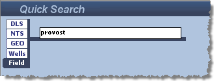
Retrieve logs and well files if you know the name of the field. Currently there is no lookup table from which you can select a field name from a list.
To search by field name
1. In the search area in the top-left of the window, clickFields.
2. Type the field name in the box. Use * or % as a multi-character wildcard.
To add additional well criteria including well parameters (TD, Spud Date, and more) click the Advanced Search checkbox and select the Wells tab.
To add additional log criteria click the Advanced Search checkbox and enter criteria using the Wells and Logs tabs.
If you add criteria to both the Wells tab and the Logs tab, LOGarc applies both.
3. Click Search.
To disable the advanced search criteria, clear the Advanced Search checkbox. You do not need to clear all of the options selected above in the Wells and Logs tabs.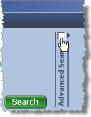
| Searching by Fields | About the Search Results Grid |
| Saving Projects |